华为昇腾8卡910b单机部署DeepSeek-R1-Distill-Llama-70B的部署过程及部分小坑
查询NPU及内存命令: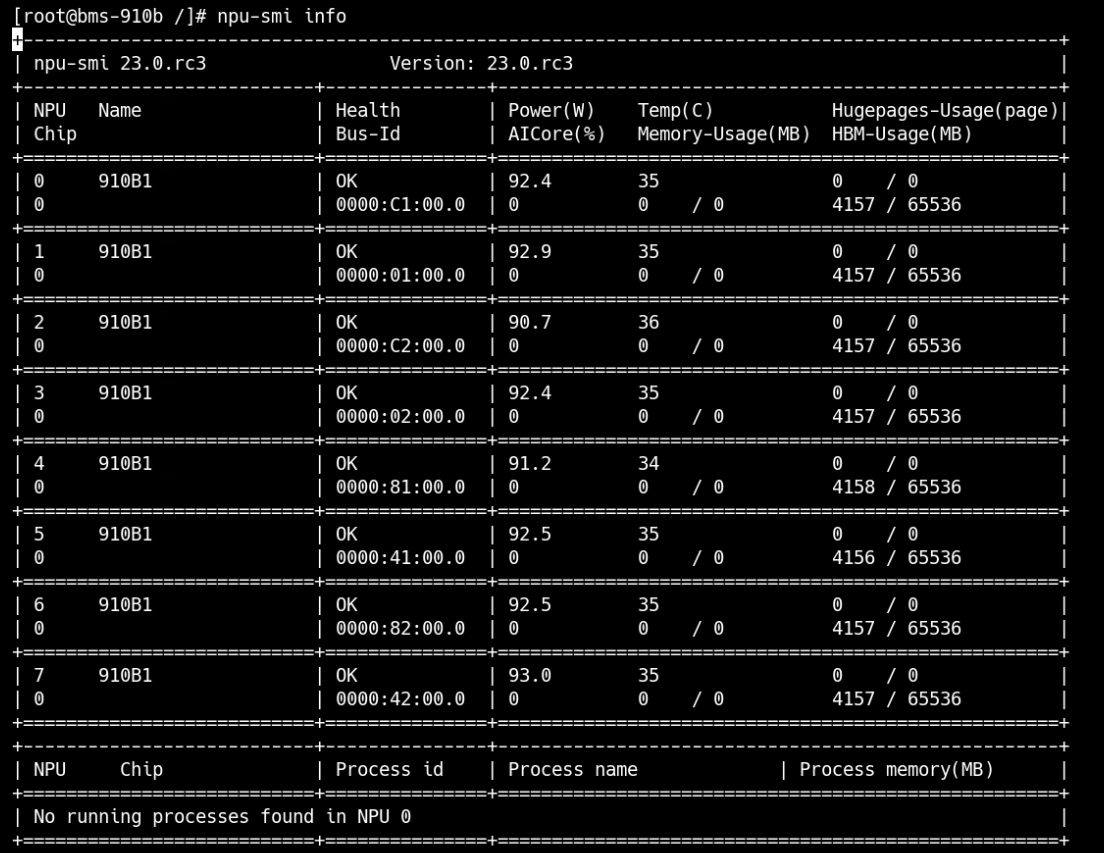

磁盘配置
1.查看存储设备
[root@bms-910b ~]# lsblk
NAME    MAJ:MIN RM  SIZE RO TYPE MOUNTPOINT
sda       8:0    0  150G  0 disk
├─sda1    8:1    0    1G  0 part /boot/efi
└─sda2    8:2    0  149G  0 part /
sdb       8:16   0  500G  0 disk
nvme0n1 259:0    0  2.9T  0 disk
nvme4n1 259:1    0  2.9T  0 disk
nvme2n1 259:2    0  2.9T  0 disk
nvme1n1 259:3    0  2.9T  0 disk
nvme3n1 259:4    0  2.9T  0 disk
2、操作硬盘分区及格式化
[root@bms-910b ~]# parted /dev/nvme0n1 mklabel gpt
Warning: The existing disk label on /dev/nvme0n1 will be destroyed and all data on this disk will be lost. Do you want to continue?
Yes/No? yes
Information: You may need to update /etc/fstab.[root@bms-910b ~]# parted /dev/nvme0n1 mkpart primary xfs 0% 100%
Information: You may ```need to update /etc/fstab.[root@bms-910b ~]# mkfs.xfs /dev/nvme0n1p1
meta-data=/dev/nvme0n1p1 isize=512 agcount=4, agsize=195350976 blks
= sectsz=512 attr=2, projid32bit=1
= crc=1 finobt=1, sparse=1, rmapbt=0
= reflink=1
data = bsize=4096 blocks=781403904, imaxpct=5
= sunit=0 swidth=0 blks
naming =version 2 bsize=4096 ascii-ci=0, ftype=1
log =internal log bsize=4096 blocks=381544, version=2
= sectsz=512 sunit=0 blks, lazy-count=1
realtime =none extsz=4096 blocks=0, rtextents=0
Discarding blocks...Done.3、查看所有块设备
[root@bms-910b ~]# lsblk
NAME        MAJ:MIN RM  SIZE RO TYPE MOUNTPOINT
sda           8:0    0  150G  0 disk
├─sda1        8:1    0    1G  0 part /boot/efi
└─sda2        8:2    0  149G  0 part /
sdb           8:16   0  500G  0 disk
nvme0n1     259:0    0  2.9T  0 disk
└─nvme0n1p1 259:6    0  2.9T  0 part
nvme4n1     259:1    0  2.9T  0 disk
nvme2n1     259:2    0  2.9T  0 disk
nvme1n1     259:3    0  2.9T  0 disk
nvme3n1     259:4    0  2.9T  0 disk
4、查询块设备信息
[root@bms-910b ~]# blkid
/dev/sda2: UUID="fceb329d-eaa2-485b-8507-acb795e6618d" BLOCK_SIZE="4096" TYPE="ext4" PARTUUID="7cc21788-7564-4e9d-9ca5-2c155ca9604e"
/dev/sda1: UUID="2A97-A210" BLOCK_SIZE="512" TYPE="vfat" PARTLABEL="EFI System Partition" PARTUUID="4aa51ffd-2bc9-44c0-a52b-a106f2722467"
/dev/nvme0n1p1: UUID="5f244587-3f94-4e1f-8177-588769947294" BLOCK_SIZE="512" TYPE="xfs" PARTLABEL="primary" PARTUUID="423a8955-e5cf-4fa2-97d5-a6dc8cba43ca"
5、挂载硬盘
[root@bms-910b ~]# mkdir -p /mnt/nvme01
[root@bms-910b ~]# mount -t xfs /dev/nvme0n1p1 /mnt/nvme01
6、配置开机自动挂载(加一行有关nvme01的配置)
echo "UUID=$(blkid -s UUID -o value /dev/nvme0n1p1) /mnt/nvme01 xfs defaults 0 0" >> /etc/fstab
昇腾社区上申请并获取最新的MindIE镜像安装包:
| 镜像介绍 | https://www.hiascend.com/developer/ascendhub/detail/af85b724a7e5469ebd7ea13c3439d48f |
|---|---|
| 镜像申请/下载 | https://www.hiascend.com/developer/ascendhub/4、detail/af85b724a7e5469ebd7ea13c3439d48f |
容器启动脚本docker_start.sh
container_name=$1
image_id=$2
model_path=$3

docker run -it --privileged --name=$container_name --net=host --shm-size=500g\
        --device=/dev/davinci_manager \
        --device=/dev/devmm_svm \
        --device=/dev/hisi_hdc \
        -v /usr/local/Ascend/driver:/usr/local/Ascend/driver \
        -v /usr/local/Ascend/add-ons/:/usr/local/Ascend/add-ons/ \
        -v /usr/local/sbin/:/usr/local/sbin/ \
        -v /var/log/npu/slog/:/var/log/npu/slog \
        -v /var/log/npu/profiling/:/var/log/npu/profiling \
	-v /var/log/npu/dump/:/var/log/npu/dump \
	-v /var/log/npu/:/usr/slog \
	-v /etc/hccn.conf:/etc/hccn.conf \
	-v $model_path:/model \
	$image_id \        /bin/bash
| 参数 | 参数说明 |
|---|---|
| –shm-size=500g | 可能存在容器中共享内存不足的情况,启动容器时需要添加该参数以配置和host宿主机共享内存。 |
| –name | 根据需要自行设定。 |
| –device | 表示映射的设备,可以挂载一个或者多个设备。需要挂载的设备如下:/dev/davinci_manager:davinci相关的管理设备。/dev/devmm_svm:内存管理相关设备。/dev/hisi_hdc:hdc相关管理设备。注:可根据以下命令查询device个数及名称方式,根据需要绑定设备,修改上面命令中的”–device=****”。`ll /dev/ |
| -v /usr/local/Ascend/driver:/usr/local/Ascend/driver:ro | 将宿主机目录“/usr/local/Ascend/driver ”挂载到容器,请根据驱动所在实际路径修改。 |
| -v /usr/local/sbin:/usr/local/sbin:ro | 挂载容器内需要使用的工具。 |
| -v /path-to-weights:/path-to-weights:ro | 挂载宿主机模型权重所在目录。 |
如果不使用--priviliged参数,则需要设置各设备,包括设置想要使用的卡号–device,例如下面为8卡:
--name <container-name> \
--device=/dev/davinci_manager \
--device=/dev/hisi_hdc \
--device=/dev/davinci0 \
--device=/dev/davinci1 \
   	--device=/dev/davinci2 \
   	--device=/dev/davinci3 \
  	--device=/dev/davinci4 \
  	--device=/dev/davinci5 \
  	--device=/dev/davinci6 \
--device=/dev/davinci7 \
启动容器
export container_name=xxx
export image_id=xxx
export model_path=xxx
bash docker_start.sh $container_name $image_id $model_path
纯模型测试
1、进入容器
docker exec -it $container_name bash2、配置容器环境变量
source /usr/local/Ascend/ascend-toolkit/set_env.sh      # 配置 cann 环境变量
source /usr/local/Ascend/mindie/set_env.sh          # 配置 mindie 环境变量
source /usr/local/Ascend/nnal/atb/set_env.sh    # 配置 atb 算子加速库环境变量
source /usr/local/Ascend/atb-models/set_env.sh  # 配置 atb-models 代码仓环境变量
进入安装目录:
cd {MindIE安装目录}/latest确认目录文件权限是否如下所示,若存在不匹配项,则参考以下命令修改权限。
chmod 750 mindie-service
chmod -R 550 mindie-service/bin
chmod -R 500 mindie-service/bin/mindie_llm_backend_connector
chmod 550 mindie-service/lib
chmod 440 mindie-service/lib/*
chmod 550 mindie-service/lib/grpc
chmod 440 mindie-service/lib/grpc/*
chmod -R 550 mindie-service/include
chmod -R 550 mindie-service/scripts
chmod 750 mindie-service/logs
chmod 750 mindie-service/conf
chmod 640 mindie-service/conf/config.json
chmod 700 mindie-service/security
chmod -R 700 mindie-service/security/*
3、执行对话测试
torchrun --nproc_per_node 8 \
         --master_port 20037 \
         -m examples.run_pa \
         --model_path ${权重路径} \
         --input_texts 'What is deep learning?' \
--max_output_length 20run_pa.py脚本参数说明
| 参数名称 | 是否为必选 | 类型 | 默认值 | 描述 | |
|---|---|---|---|---|---|
| –model_path | 是 | string | “” | 模型权重路径。该路径会进行安全校验,必须使用绝对路径,且和执行推理用户的属组和权限保持一致。 | |
| –input_texts | 否 | string | “What’s deep learning?” | 推理文本或推理文本路径,多条推理文本间使用空格分割。 | |
| –input_ids | 否 | string | None | 推理文本经过模型分词器处理后得到的token id列表,多条推理请求间使用空格分割,单个推理请求内每个token使用逗号隔开。 | |
| –input_file | 否 | string | None | 仅支持jsonl格式文件,每一行必须为List[Dict]格式的按时间顺序排序的对话数据,每个Dict字典中需要至少包含”role”和”content”两个字段。 | |
| –input_dict | 否 | parse_list_of_json | None | 推理文本以及对应的adapter名称。格式形如:’[{“prompt”: “A robe takes 2 bolts of blue fiber and half that much white fiber. How many bolts in total does it take?”, “adapter”: “adapter1”}, {“prompt”: “What is deep learning?”, “adapter”: “base”}]’ | |
| –max_prefill_batch_size | 否 | int或者None | None | 模型推理最大Prefill Batch Size。 | |
| –max_position_embeddings | 否 | int或者None | None | 模型可接受的最大上下文长度。当此值为None时,则从模型权重文件中读取。 | |
| –max_input_length | 否 | int | 1024 | 推理文本最大token数。 | |
| –max_output_length | 否 | int | 20 | 推理结果最大token数。 | |
| –max_prefill_tokens | 否 | int | -1 | 模型Prefill推理阶段最大可接受的token数。若输入为-1,则max_prefill_tokens = max_batch_size * (max_input_length + max_output_length) | |
| –max_batch_size | 否 | int | 1 | 模型推理最大batch size。 | |
| –block_size | 否 | int | 128 | KV Cache分块存储,每块存储的最大token数,默认为128。 | |
| –chat_template | 否 | string或者None | None | 对话模型的prompt模板。 | |
| –ignore_eos | 否 | bool | store_true | 当推理结果中遇到eos token(句子结束标识符)时,是否结束推理。若传入此参数,则忽略eos token。 | |
| –is_chat_model | 否 | bool | store_true | 是否支持对话模式。若传入此参数,则进入对话模式。 | |
| –is_embedding_model | 否 | bool | store_true | 是否为embedding类模型。默认为因果推断类模型,若传入此参数,则为embedding类模型。 | |
| –load_tokenizer | 否 | bool | True | 是否加载tokenizer。若传入False,则必须传入input_ids参数,且推理输出为token id。 | |
| –enable_atb_torch | 否 | bool | store_true | 是否使用Python组图。默认使用C++组图,若传入此参数,则使用Python组图。 | |
| –kw_args | 否 | string | “” | 扩展参数,支持用户通过扩展参数进行功能扩展。 | |
| –trust_remote_code | 否 | bool | store_true | 是否信任模型权重路径下的自定义代码文件。默认不执行。若传入此参数,则transformers会执行用户权重路径下的自定义代码文件,这些代码文件的功能的安全性需由用户保证,请提前做好安全性检查。 |
说明:
run_pa.py脚本用于纯模型快速测试,脚本中未增加强校验,出现异常情况时,会直接抛出异常信息。例如:
- input_texts、input_ids、input_file、input_dict参数包含推理内容,程序进行数据处理的时间和传入数据量成正比。同时这些输入会被转换成token id搬运至NPU,传入数据量过大可能会导致这些NPU tensor占用显存过大,而出现由out of memory导致的报错信息,例如:”req: xx input length: xx is too long, max_prefill_tokens: xx”等报错信息。
- chat_template参数可以使用两种形式输入:模板文本或模板文件的路径。当以模板文本输入时,若文本长度过大,可能会导致运行缓慢。
- 脚本会基于max_batch_size、max_input_length、max_output_length、max_prefill_batch_size和max_prefill_tokens等参数申请推理输入及KV Cache,若用户传入数值过大,会出现由out of memory导致的报错信息,例如:”RuntimeError: NPU out of memory. Tried to allocate xxx GiB.”。
- 脚本会基于max_position_embeddings参数,申请旋转位置编码和attention mask等NPU tensor,若用户传入数值过大,会出现由out of memory导致的报错信息,例如:”RuntimeError: NPU out of memory. Tried to allocate xxx GiB.”。
- block_size参数若小于张量并行场景下每张卡实际分到的注意力头个数,会出现由shape不匹配导致的报错(”Setup fail, enable log: export ASDOPS_LOG_LEVEL=ERROR, export ASDOPS_LOG_TO_STDOUT=1 to find the first error. For more details, see the MindIE official document.”),需开启日志查看详细信息。
4、性能测试
进入ModelTest路径
cd $ATB_SPEED_HOME_PATH/tests/modeltest/运行测试脚本
bash run.sh pa_[data_type] performance [case_pair] [batch_size] ([prefill_batch_size]) [model_name] ([is_chat_model]) (lora [lora_data_path]) [weight_dir] ([trust_remote_code]) [chip_num] ([parallel_params]) ([max_position_embedding/max_sequence_length])具体执行batch=1, 输入长度256, 输出长度256用例的8卡并行性能测试命令如下,
Atlas 800I A2:
bash run.sh pa_bf16 performance [[256,256]] 1 llama ${weight_path} 8注:ModelTest为大模型的性能和精度提供测试功能。使用文档请参考${ATB_SPEED_HOME_PATH}/tests/modeltest/README.md
服务化推理
打开配置文件
vim /usr/local/Ascend/mindie/latest/mindie-service/conf/config.json修改配置文件,config.json参考配置如下:
配置参数说明
{
    "Version": "1.0.0",
    "LogConfig" :
    {
        "logLevel" : "Info",
        "logFileSize" : 20,
        "logFileNum" : 20,
        "logPath" : "logs/mindservice.log"
    },

    "ServerConfig" :
    {
        "ipAddress" : "127.0.0.1",
        "managementIpAddress": "127.0.0.2",
        "port" : 1025,
        "managementPort" : 1026,
        "metricsPort" : 1027,
        "allowAllZeroIpListening" : false,
        "maxLinkNum" : 1000,
        "httpsEnabled" : true,
        "fullTextEnabled" : false,
        "tlsCaPath" : "security/ca/",
        "tlsCaFile" : ["ca.pem"],
        "tlsCert" : "security/certs/server.pem",
        "tlsPk" : "security/keys/server.key.pem",
        "tlsPkPwd" : "security/pass/key_pwd.txt",
        "tlsCrlPath" : "security/certs/",
        "tlsCrlFiles" : ["server_crl.pem"],
        "managementTlsCaFile" : ["management_ca.pem"],
        "managementTlsCert" : "security/certs/management/server.pem",
        "managementTlsPk" : "security/keys/management/server.key.pem",
        "managementTlsPkPwd" : "security/pass/management/key_pwd.txt",
        "managementTlsCrlPath" : "security/management/certs/",
        "managementTlsCrlFiles" : ["server_crl.pem"],
        "kmcKsfMaster" : "tools/pmt/master/ksfa",
        "kmcKsfStandby" : "tools/pmt/standby/ksfb",
        "inferMode" : "standard",
        "interCommTLSEnabled" : true,
        "interCommPort" : 1121,
        "interCommTlsCaPath" : "security/grpc/ca/",
        "interCommTlsCaFiles" : ["ca.pem"],
        "interCommTlsCert" : "security/grpc/certs/server.pem",
        "interCommPk" : "security/grpc/keys/server.key.pem",
        "interCommPkPwd" : "security/grpc/pass/key_pwd.txt",
        "interCommTlsCrlPath" : "security/grpc/certs/",
        "interCommTlsCrlFiles" : ["server_crl.pem"],
        "openAiSupport" : "vllm"
    },

    "BackendConfig": {
        "backendName" : "mindieservice_llm_engine",
        "modelInstanceNumber" : 1,
        "npuDeviceIds" : [[0,1,2,3]],
        "tokenizerProcessNumber" : 8,
        "multiNodesInferEnabled": false,
        "multiNodesInferPort": 1120,
        "interNodeTLSEnabled": true,
        "interNodeTlsCaPath": "security/grpc/ca/",
        "interNodeTlsCaFiles": ["ca.pem"],
        "interNodeTlsCert": "security/grpc/certs/server.pem",
        "interNodeTlsPk": "security/grpc/keys/server.key.pem",
        "interNodeTlsPkPwd": "security/grpc/pass/mindie_server_key_pwd.txt",
        "interNodeTlsCrlPath" : "security/grpc/certs/",
        "interNodeTlsCrlfiles" : ["server_crl.pem"],
        "interNodeKmcKsfMaster": "tools/pmt/master/ksfa",
        "interNodeKmcKsfStandby": "tools/pmt/standby/ksfb",
        "ModelDeployConfig":
        {
            "maxSeqLen" : 2560,
            "maxInputTokenLen" : 2048,
            "truncation" : false,
            "ModelConfig" : [
                {
                    "modelInstanceType": "Standard",
                    "modelName" : "DeepSeek-R1-Distill-Llama-70B",
                    "modelWeightPath" : "/data/atb_testdata/weights/llama1-65b-safetensors",
                    "worldSize" : 4,
                    "cpuMemSize" : 5,
                    "npuMemSize" : -1,
                    "backendType": "atb",
                    "trustRemoteCode": false
                }
            ]
        },

        "ScheduleConfig":
        {
            "templateType": "Standard",
            "templateName" : "Standard_LLM",
            "cacheBlockSize" : 128,

            "maxPrefillBatchSize" : 50,
            "maxPrefillTokens" : 8192,
            "prefillTimeMsPerReq" : 150,
            "prefillPolicyType" : 0,

            "decodeTimeMsPerReq" : 50,
            "decodePolicyType" : 0,

            "maxBatchSize" : 200,
            "maxIterTimes" : 512,
            "maxPreemptCount" : 0,
            "supportSelectBatch" : false,
            "maxQueueDelayMicroseconds" : 5000
        }
    }
}
启动服务。启动命令需在/{MindIE安装目录}/latest/mindie-service目录中执行。
(推荐)使用后台进程方式启动服务。
nohup ./bin/mindieservice_daemon > output.log 2>&1 &tail -f output.log在标准输出流捕获到的文件中,打印如下信息说明启动成功。
Daemon start success!直接启动服务。
./bin/mindieservice_daemon回显如下则说明启动成功。
Daemon start success!测试
目前 MindIE-Service 的 API 接口兼容 OpenAI、 vLLM、HuggingFace Text Generation Inference 、NVIDIA Triton Inference Server 推理框架。
OpenAI: /v1/chat/completions
vLLM: /generate
HuggingFace TGI: /generate、/generate_stream
NVIDIA Triton Inference Server:/v2/models/${MODEL_NAME}[/versions/${MODEL_VERSION}]/inferv2/models/${MODEL_NME}[/versions/${MODEL_VERSION}]/generatev2/models/${MODEL_NAME}[/versions/${MODEL_VERSION}]/generate_stream
新建窗口测试(VLLM接口)
curl 127.0.0.1:1025/generate -d '{
"prompt": "西红柿炒鸡蛋怎么做?",
"max_tokens": 128,
"stream": false,
"do_sample":true,
"repetition_penalty": 1.00,
"temperature": 0.01,
"top_p": 0.001,
"top_k": 1,
"model": "DeepSeek-R1-Distill-Llama-70B"
}'
OpenAI格式接口
curl "http://127.0.0.1:1025/v1/chat/completions" \
  -H "Content-Type: application/json" \
  -d '{
    "model": "DeepSeek-R1-Distill-Llama-70B",
    "messages": [
      {
        "role": "user",
        "content": "西红柿炒鸡蛋怎么做?"
      }
    ],
    "max_tokens":128
  }'
接入MaxKB
MaxKB部署参考官方文档
根据config.json配置文件中"openAiSupport"字段确认接口方式,此处为 "vllm"
选择vllm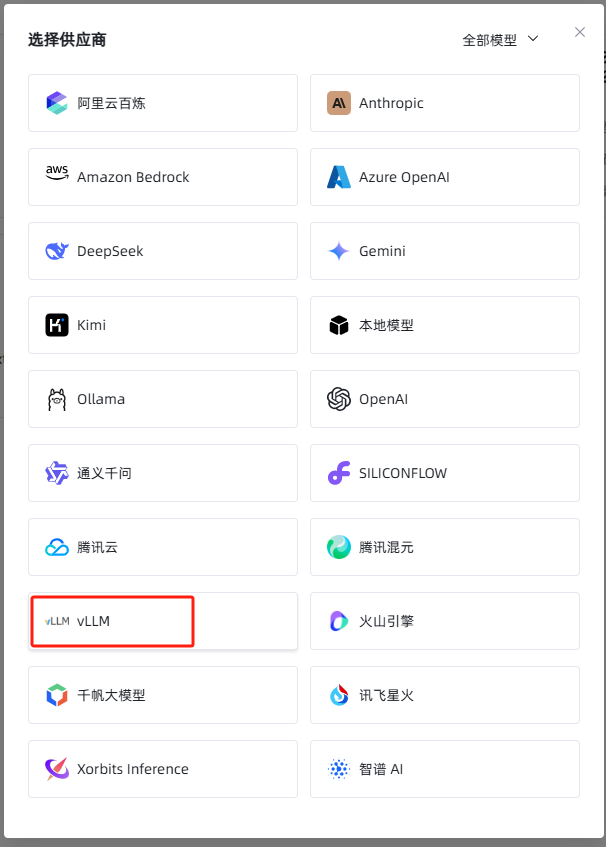
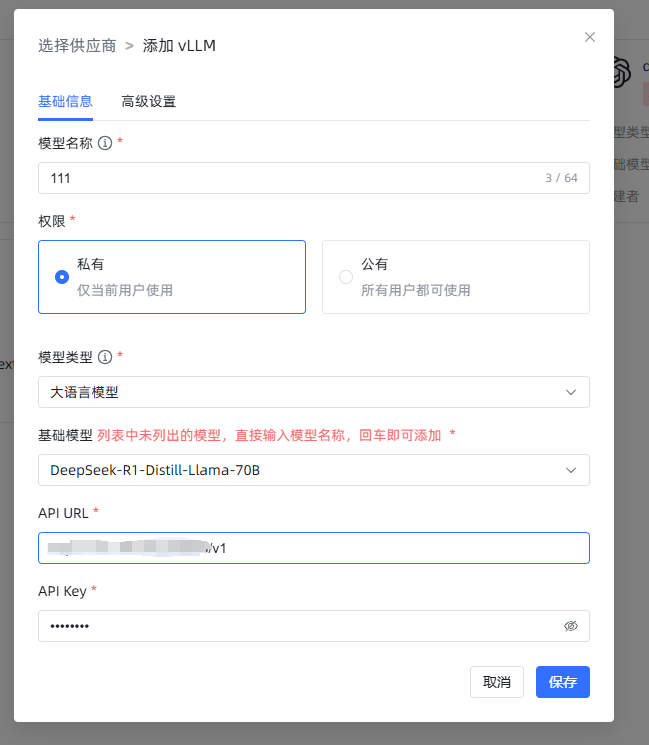
输入"modelName" : "DeepSeek-R1-Distill-Llama-70B",设置的模型名称,输入url,apikey随便填,然后保存使用即可。
奇怪的问题
DeepSeek输出时前<think>标签丢失,在输出时只有</think>

已知为BUG,需修改下载模型中的tokenizer_config.json,参考Issue-13125tokenizer_config.json:
{
  "add_bos_token": true,
  "add_eos_token": false,
  "bos_token": {
    "__type": "AddedToken",
    "content": "<|begin▁of▁sentence|>",
    "lstrip": false,
    "normalized": true,
    "rstrip": false,
    "single_word": false
  },
  "clean_up_tokenization_spaces": false,
  "eos_token": {
    "__type": "AddedToken",
    "content": "<|end▁of▁sentence|>",
    "lstrip": false,
    "normalized": true,
    "rstrip": false,
    "single_word": false
  },
  "legacy": true,
  "model_max_length": 16384,
  "pad_token": {
    "__type": "AddedToken",
    "content": "<|end▁of▁sentence|>",
    "lstrip": false,
    "normalized": true,
    "rstrip": false,
    "single_word": false
  },
  "sp_model_kwargs": {},
  "unk_token": null,
  "tokenizer_class": "LlamaTokenizerFast",
  "chat_template": "{% if not add_generation_prompt is defined %}{% set add_generation_prompt = false %}{% endif %}{% set ns = namespace(is_first=false, is_tool=false, is_output_first=true, system_prompt='') %}{%- for message in messages %}{%- if message['role'] == 'system' %}{% set ns.system_prompt = message['content'] %}{%- endif %}{%- endfor %}{{bos_token}}{{ns.system_prompt}}{%- for message in messages %}{%- if message['role'] == 'user' %}{%- set ns.is_tool = false -%}{{'<|User|>' + message['content']}}{%- endif %}{%- if message['role'] == 'assistant' and message['content'] is none %}{%- set ns.is_tool = false -%}{%- for tool in message['tool_calls']%}{%- if not ns.is_first %}{{'<|Assistant|><|tool▁calls▁begin|><|tool▁call▁begin|>' + tool['type'] + '<|tool▁sep|>' + tool['function']['name'] + '\\n' + '```json' + '\\n' + tool['function']['arguments'] + '\\n' + '```' + '<|tool▁call▁end|>'}}{%- set ns.is_first = true -%}{%- else %}{{'\\n' + '<|tool▁call▁begin|>' + tool['type'] + '<|tool▁sep|>' + tool['function']['name'] + '\\n' + '```json' + '\\n' + tool['function']['arguments'] + '\\n' + '```' + '<|tool▁call▁end|>'}}{{'<|tool▁calls▁end|><|end▁of▁sentence|>'}}{%- endif %}{%- endfor %}{%- endif %}{%- if message['role'] == 'assistant' and message['content'] is not none %}{%- if ns.is_tool %}{{'<|tool▁outputs▁end|>' + message['content'] + '<|end▁of▁sentence|>'}}{%- set ns.is_tool = false -%}{%- else %}{% set content = message['content'] %}{% if '</think>' in content %}{% set content = content.split('</think>')[-1] %}{% endif %}{{'<|Assistant|>' + content + '<|end▁of▁sentence|>'}}{%- endif %}{%- endif %}{%- if message['role'] == 'tool' %}{%- set ns.is_tool = true -%}{%- if ns.is_output_first %}{{'<|tool▁outputs▁begin|><|tool▁output▁begin|>' + message['content'] + '<|tool▁output▁end|>'}}{%- set ns.is_output_first = false %}{%- else %}{{'\\n<|tool▁output▁begin|>' + message['content'] + '<|tool▁output▁end|>'}}{%- endif %}{%- endif %}{%- endfor -%}{% if ns.is_tool %}{{'<|tool▁outputs▁end|>'}}{% endif %}{% if add_generation_prompt and not ns.is_tool %}{{'<|Assistant|>'}}{% endif %}"
}ollma丢失<think>
参考Issue-8965,注意核对模型
FROM "jp_calibration/DeepSeek-R1-Distill-Qwen-32B-Q5_K_S-jp.gguf"

PARAMETER stop "<|begin▁of▁sentence|>"
PARAMETER stop "<|end▁of▁sentence|>"
PARAMETER stop "<|User|>"
PARAMETER stop "<|Assistant|>"


PARAMETER temperature 0.5
PARAMETER top_k 40
PARAMETER top_p 0.95
PARAMETER repeat_penalty 1.1
PARAMETER repeat_last_n 64

SYSTEM """
The user asks a question, and the Assistant solves it. The assistant first thinks about the reasoning process in the mind and then provides the user with the answer.
The reasoning process and answer are enclosed within <think> </think> and <answer> </answer> tags, respectively, i.e., <think> reasoning process here </think> <answer> answer here </answer>
If the user's question is math related, please put your final answer within \\boxed{{}}.
"""

TEMPLATE """
{{- if .System }}{{ .System }}{{ end }}
{{- range $i, $_ := .Messages }}
{{- $last := eq (len (slice $.Messages $i)) 1}}
{{- if eq .Role "user" }}<|User|>{{ .Content }}
{{- else if eq .Role "assistant" }}<|Assistant|>{{ .Content }}{{- if not $last }}<|end▁of▁sentence|>{{- end }}
{{- end }}
{{- if and $last (ne .Role "assistant") }}<|Assistant|>{{- end }}
{{- end -}}
"""